

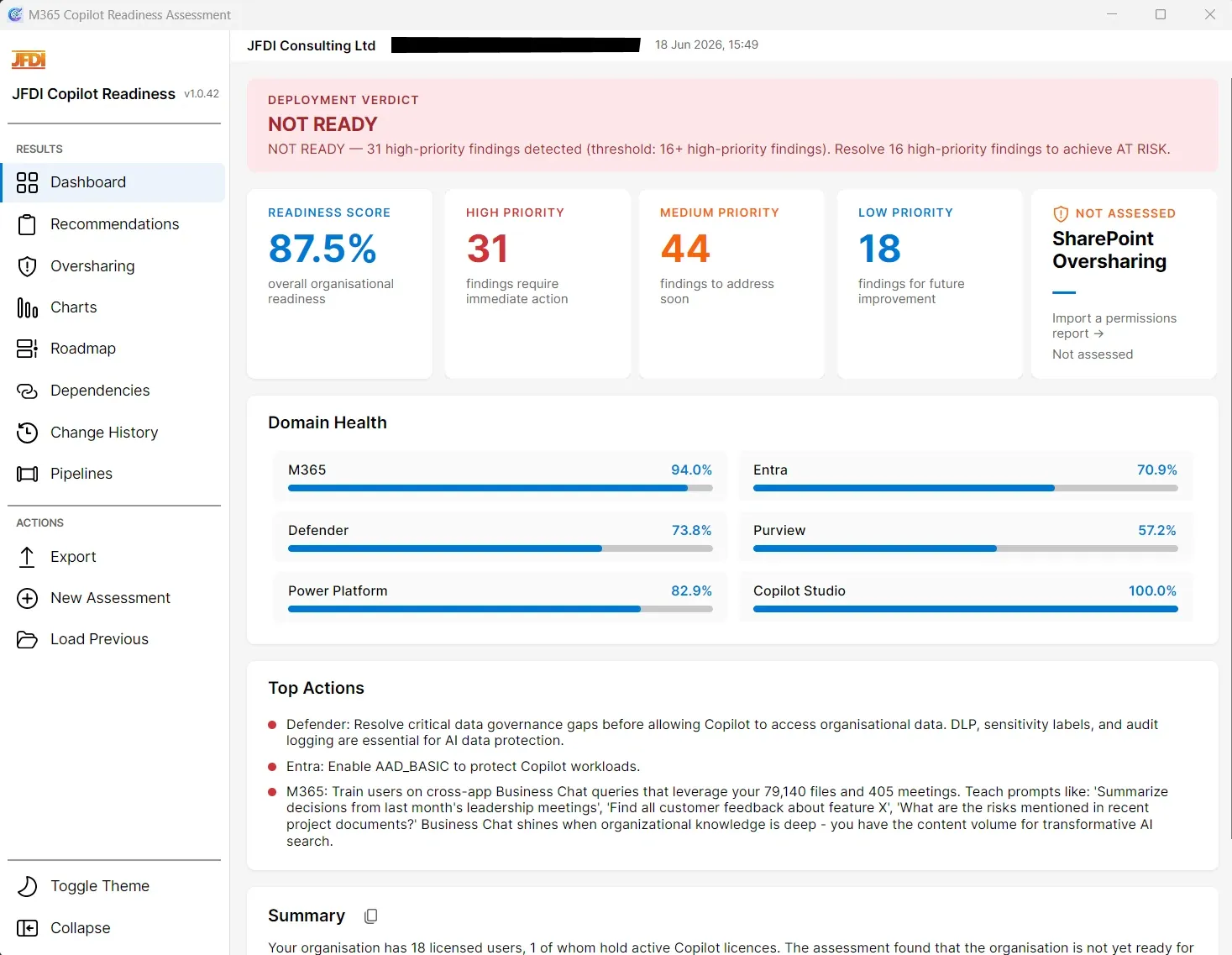
Know whether your Microsoft 365 tenant is ready for Copilot, and what to fix first
The JFDI Copilot Readiness Assessment Tool analyses your live tenant and scores readiness across Microsoft 365, Entra, Defender, Purview, Power Platform, and Copilot Studio, assessing each service where it is provisioned in your tenant. It then generates the executive deck, prioritised remediation backlog, and phased roadmap you need to move from assessment to rollout, all written directly from your tenant data.
It goes beyond Microsoft’s baseline readiness checks with 46 cross-domain composite assessments, a Copilot Rollout Risk Score from a SharePoint permissions export you provide, time-to-ready estimation, and consultant-grade PowerPoint, Excel, Word, and CSV outputs.
No activation or trial key needed. Free runs cover Entra ID against any Microsoft 365 tenant. Subscribe to add the other workloads and the full deliverables.
What’s in the Free tier
Unlicensed and test tenants get the Free tier automatically. It uses the same installer and assessment pipeline as the paid product, scoped to Entra ID and to a preview of the recommendations, so you can validate the tool against your own tenant before committing.
The Free tier covers
What subscribing unlocks
In one assessment run, you get
Why Microsoft’s baseline isn’t enough
The Microsoft baseline tool runs 182 individual licence and feature checks across six service areas, then outputs a flat recommendations list. The JFDI tool starts from the same tenant data and goes further:
46 composite assessments
Cross-domain analyses that synthesise findings from M365, Entra, Defender, Purview, Power Platform, and Copilot Studio to reveal insights no single-domain check can surface.
Readiness scorecard
Per-domain readiness scores (0-100%), an overall organisational score, and a verdict that tells you how many findings stand between you and the next readiness tier.
Time-to-ready estimation
Minimum and maximum weeks until deployment-ready (clearing Phase 0 blockers and Phase 1 pre-deployment work), with per-phase effort breakdowns in hours derived from finding complexity, priority, and volume.
5-phase remediation roadmap
Blockers, Pre-deployment, Early Lifecycle, Optimisation, and Adoption Opportunities, sorted by complexity and domain so the execution order is obvious.
Consultant-grade deliverables
A presentation-ready PowerPoint deck, multi-worksheet Excel workbook, CSV export, and ~200-word executive summary, written directly from your tenant data.
Delta reporting
Capture assessment snapshots and demonstrate measurable progress between engagements: Resolved, Regressed, Improved, New Finding, Unchanged.
The biggest Copilot risk isn’t licensing, it’s what Copilot can already see
The single biggest deployment-day shock with Microsoft 365 Copilot is over-shared SharePoint content. Copilot does not need a permission of its own; it surfaces whatever the prompting user has access to. Sites set to “Everyone except external users”, libraries shared via “Anyone with the link” anonymous links, individual permission grants outside SharePoint groups, broken inheritance, and forgotten restore-snapshot sites all become Copilot exposure paths the moment a licence is provisioned.
The JFDI tool ingests existing permissions reports and turns them into a Copilot Rollout Risk Score: a single 0-to-100 metric with five colour-banded thresholds (Clean, Low, Moderate, High, Severe). A supplementary Permission Hygiene % sits alongside it and tells you how much of the estate is on clean inheritance.
What it analyses
The score is a weighted composite of five sub-scores:
What it reads
The tool accepts permissions reports from the providers consultants and tenant admins already use, in either CSV or XLSX. Two complementary source types are supported:
Type A: detailed permissions
Line-by-line permission exports, down to the individual user, resource, and how access was granted. Casper365 full permissions export is the native format. Other providers, such as ShareGate, Quest On Demand, and SysKit Point are supported via column mapping. Unlocks the full per-user remediation register and external-user detail.
Type B: site-level summary
Microsoft’s own SharePoint Advanced Management (SAM) ‘Site permissions across your tenant’ report. Aggregates broadcast-sharing signals (Anyone links, EEEU counts, Everyone access, external sharing posture) per site collection.
Using both gives the most complete picture. Type A supplies user-level detail; Type B adds broadcast-sharing signals Type A may not capture. Non-Casper365 sources are handled via a simple JSON column-mapping file, with no per-tool parser engineering required.
What it produces
How the assessment runs
The assessment runs as a guided pipeline. Connect it to a tenant, authenticate, and wait for collection to complete.
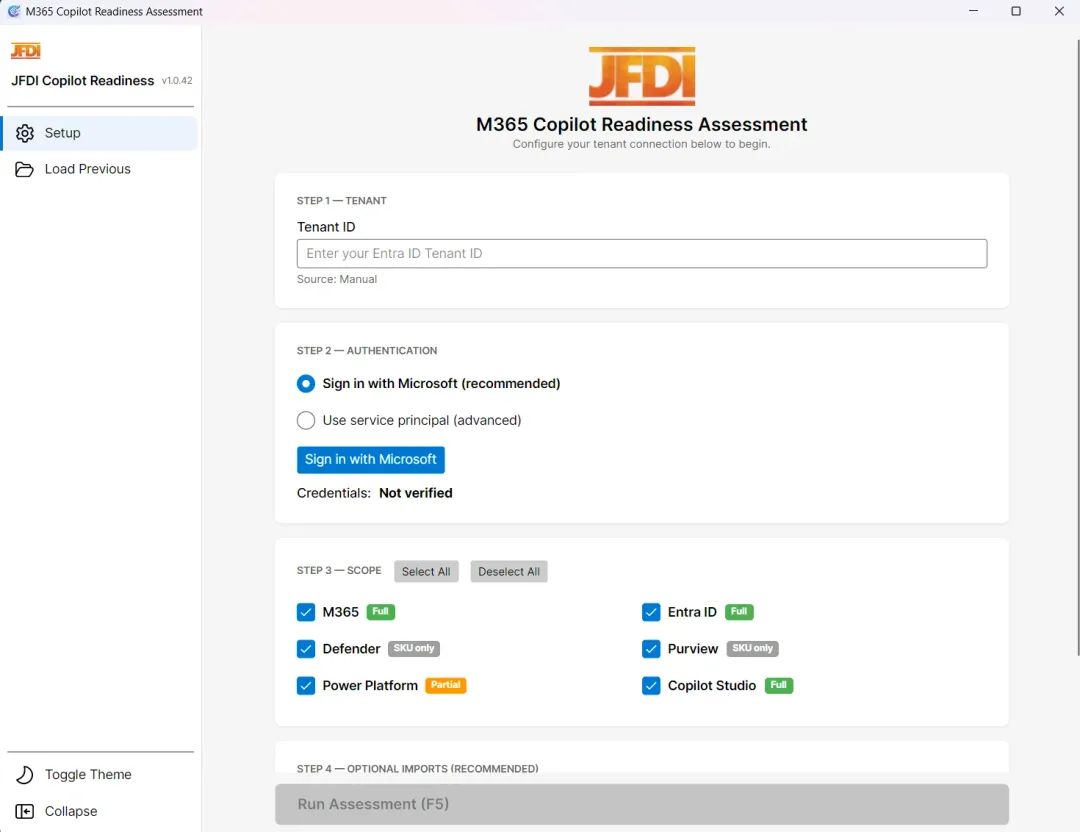
1. Configure the tenant and scope
Enter the Entra Tenant ID for the tenant you are assessing (licensed deployments are validated against this Tenant ID), sign in with Microsoft (or use a service principal for unattended collection of the Graph, Defender, and Power Platform domains), and choose which of the six domains to assess: M365, Entra ID, Defender, Purview, Power Platform, and Copilot Studio. Optional imports (for example, a SharePoint permissions report for the over-sharing analysis) attach in the same step.
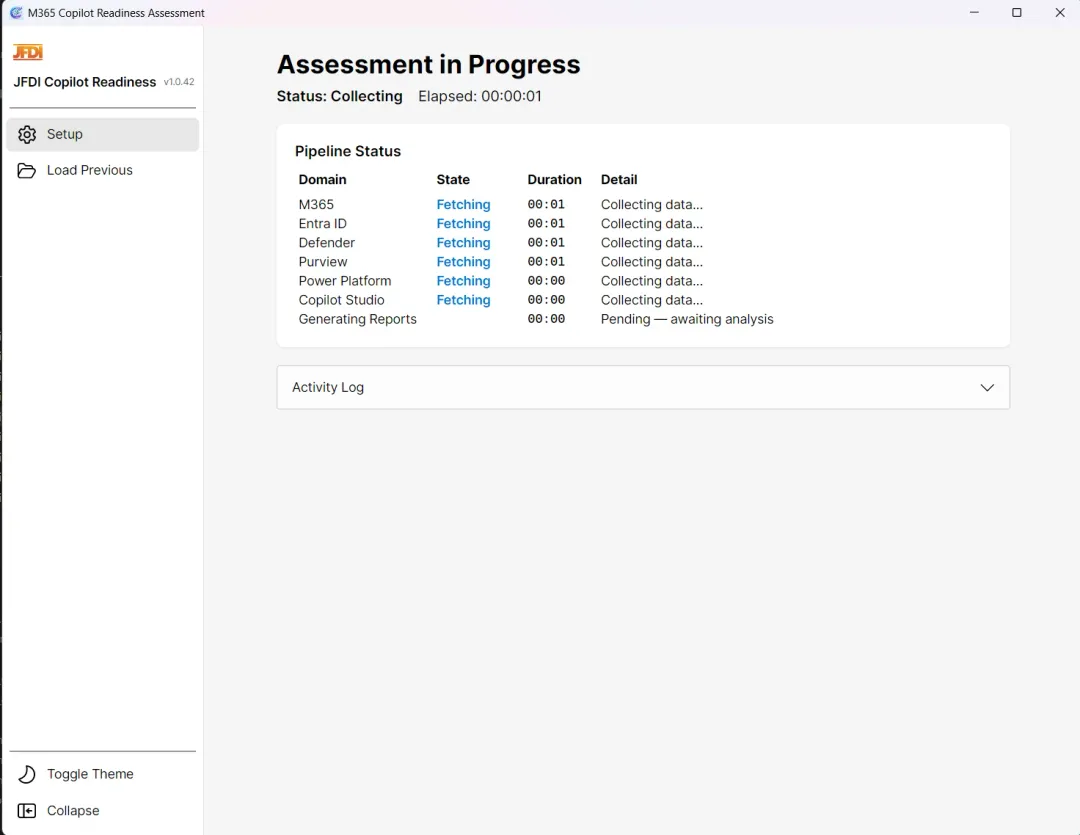
2. Watch the pipeline run
The pipeline collects data in parallel from Microsoft Graph, Defender, Exchange Online, and the Power Platform API (which also powers the Copilot Studio assessment). Each domain reports its own elapsed time and progress so consultants and tenant administrators can see exactly where collection is up to.
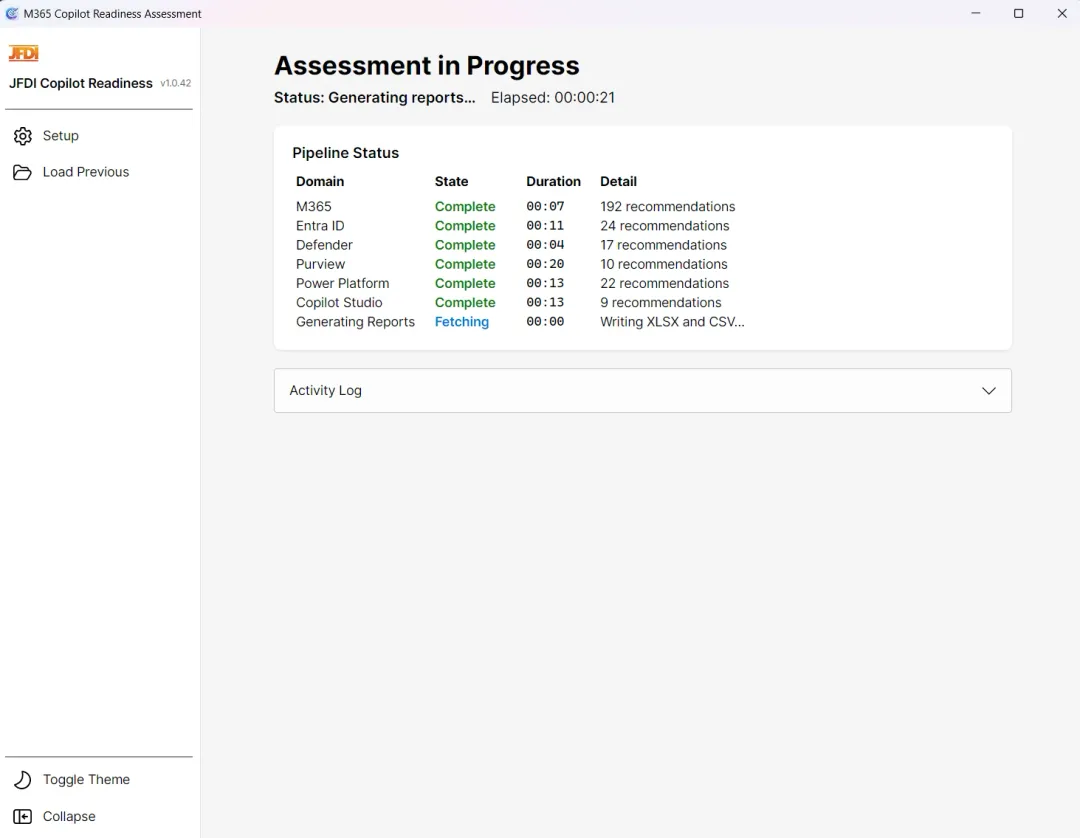
3. Get the recommendations
Each domain completes with a recommendation count, broken down by high, medium, and low priority across the composite assessments. The Generating Reports phase writes the XLSX, CSV, PowerPoint, and Word outputs, and the dashboard opens with the score, verdict, and remediation roadmap ready to walk through.
Cross-domain intelligence
The 46 composite assessments are where the tool’s value lives. Each one synthesises findings from multiple Microsoft 365 domains to surface insights no single-domain check can reveal.
Copilot capability readiness
Organisational maturity
Risk and exposure
Governance alignment
The business-intelligence layer
Every finding the tool surfaces is enriched with the metadata stakeholders ask for before they sign off a programme.
Readiness scorecard
Per-domain readiness scores for M365, Entra, Defender, Purview, Power Platform, and Copilot Studio. Active-usage detection flags domains with no assessed activity so consultants don’t over-index on inactive services.
Enriched verdict
Goes beyond a binary ‘Ready / Not Ready’. The verdict sits on a four-tier scale (Not Ready, At Risk, Needs Improvement, Ready) and tells you exactly how many findings stand between you and the next tier, with progression guidance like ‘Resolve 3 more high-priority findings to move from At Risk to Needs Improvement’.
Collaboration maturity model
A five-factor quantitative model producing a maturity level. Enables consultants to frame Copilot as building on existing habits rather than introducing new ones, and gives executives concrete evidence of organisational readiness beyond technology.
Remediation effort scoring
Each finding carries an effort estimate, from 1-2 hours up to 1-3 days, and is assigned to the team that owns the fix (Identity & Access, IT Security, Compliance, or Platform). Those estimates feed directly into the roadmap and the time-to-ready calculation.
A phased remediation roadmap
The tool organises every recommendation into a five-phase roadmap, sorted by complexity and domain so the execution sequence is obvious from day one.
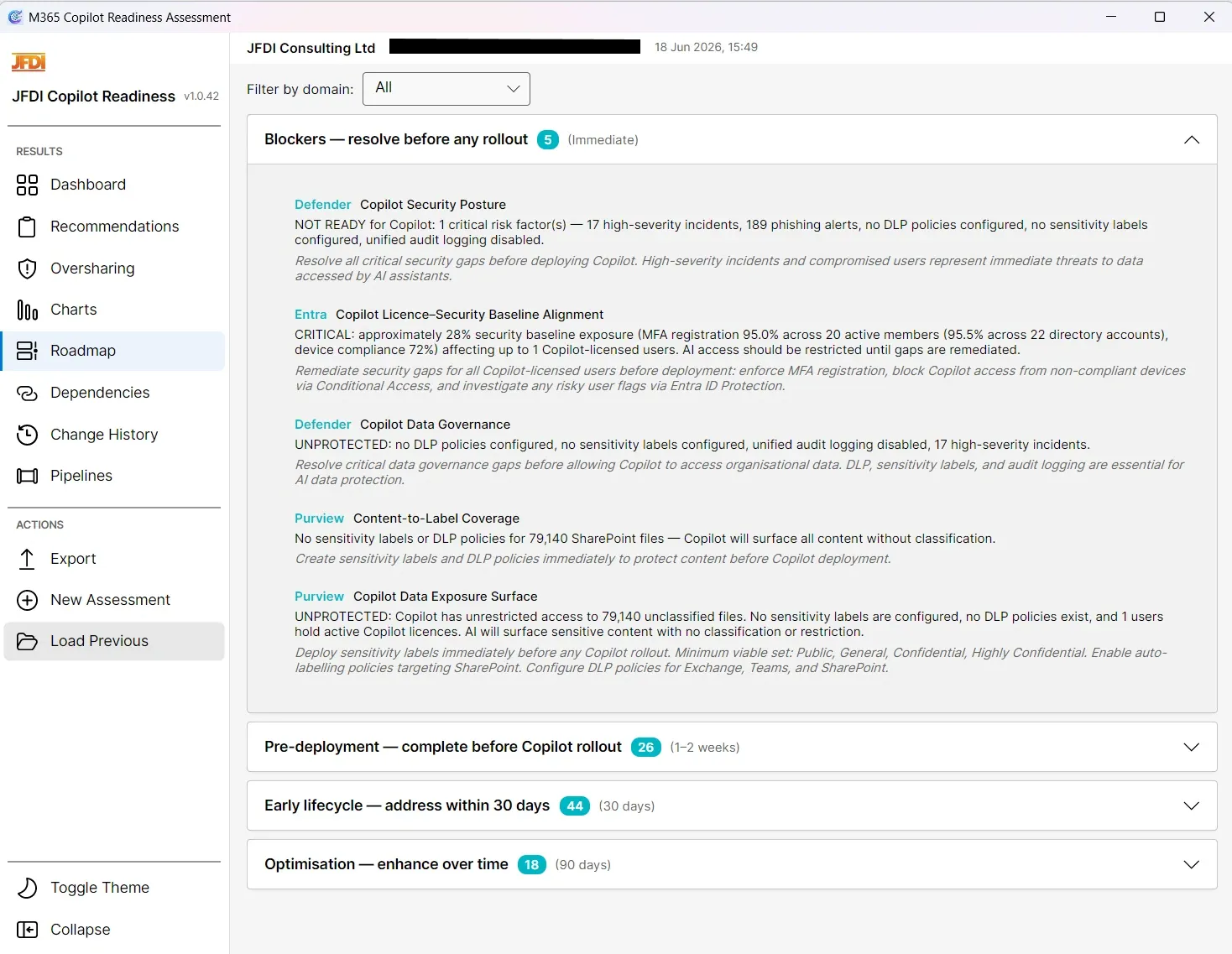
Consultant-grade deliverables, generated from your tenant data
PowerPoint deck
Title slide, executive summary narrative, readiness scorecard, status distribution donut, domain findings bar chart, 6-axis polar radar chart, detailed findings (auto-paginated), quick wins, phased roadmap, dependency mapping, delta slides when a baseline exists, and next steps. Charts rendered as embedded PNGs so the deck displays correctly on any system.
Excel workbook
Multi-worksheet workbook with recommendation details and all metadata, the scorecard summary, and the roadmap phasing breakdown. Filterable and sortable for customer-side analysis.
CSV export
Flat recommendation list for import into project management tools, ServiceNow, or any custom workflow that needs a structured backlog.
Executive summary narrative
An auto-generated ~200-word summary that profiles the tenant, delivers a verdict statement with finding counts, highlights critical gaps by domain concentration, acknowledges existing strengths, and recommends prioritised next steps.
Charts inside the application
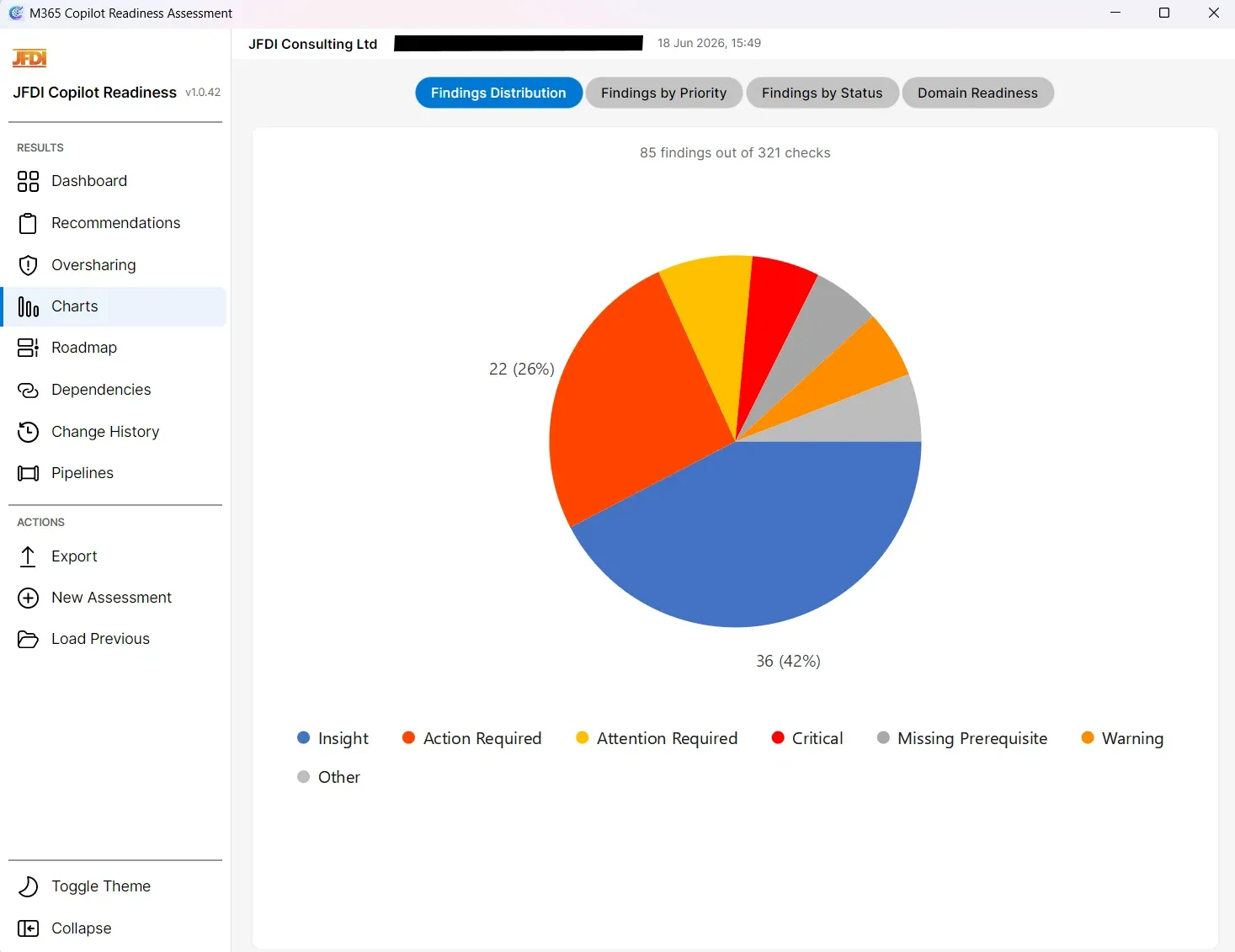
The Charts view inside the application gives consultants four interactive lenses on the same data: findings distribution (status pie), findings by priority (stacked bar per domain), findings by status (stacked bar per domain), and a six-axis domain-readiness radar. Each chart is exported as an embedded PNG in the PowerPoint deck, so the customer’s presentation displays correctly on any system without chart-rendering dependencies.
The three exemplar charts below show the same outputs as they appear in the PowerPoint deck, drawn from a redacted customer assessment.
Export to whichever format your stakeholders need
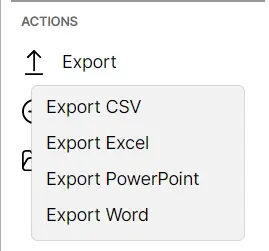
The Export action surfaces every output format generated by the pipeline: a presentation-ready PowerPoint deck for executives, a multi-worksheet Excel workbook for the remediation team, a flat CSV for project-management imports, and a Word document for internal documentation. Every format is built from the same underlying assessment state, so there is no double-keying.
Track measurable progress between engagements
The tool captures point-in-time assessment snapshots. When a baseline snapshot exists, it produces a change analysis with five status transitions: Resolved, Regressed, Improved, New Finding, and Unchanged. Consultants use this to demonstrate measurable progress between engagements and to give customers evidence of remediation ROI.
Where your data goes
The tool runs against a live Microsoft 365 tenant, so it is worth being explicit about where that data goes.
For the full picture of what the tool reads, the authentication models on offer, and how access is granted and revoked, see the permissions and privacy reference, written for the administrators and security reviewers who sign off the access before an assessment runs.
Pricing
The Copilot Readiness Assessment Tool is licensed per Microsoft 365 tenant. Each licence is activated against a specific Entra Tenant ID and allows unlimited assessment runs, exports, snapshots, and delta reporting for that tenant. Once activated, a licence cannot be reassigned to another tenant. It runs as a cross-platform desktop application (Windows, macOS, Linux). Buy directly from us as a perpetual licence, or subscribe on the Microsoft Marketplace.
Single tenant licence
One licence for one Microsoft 365 tenant, bound to its Entra Tenant ID and not reassignable once activated. Unlimited assessment runs for that tenant. Includes all six in-scope domains, the SharePoint over-sharing analysis when a permissions export is supplied, and the complete deliverable set (PowerPoint, Excel, Word, CSV).
- Licensed for one specific Entra Tenant ID (not reassignable once activated)
- Unlimited assessment runs for that licensed tenant
- All 46 cross-domain composite assessments
- Copilot Rollout Risk Score (SharePoint over-sharing)
- PowerPoint, Excel, Word and CSV deliverables
- Assessment snapshots for delta reporting between engagements
- Cross-platform desktop application (Windows, macOS, Linux)
10-tenant licence pack
Ten tenant licences for MSPs and larger teams assessing multiple customer tenants. Each licence is activated against one specific Entra Tenant ID. Saves a third on the per-licence price, with centralised licence administration.
- Ten tenant-bound licences, one Entra Tenant ID each
- Saves a third versus ten single tenant licences
- Centralised licence administration
- All 46 composite assessments and the full deliverable set
- Copilot Rollout Risk Score (SharePoint over-sharing)
- Assessment snapshots for delta reporting between engagements
Prefer a subscription? Now on Microsoft Marketplace
For teams that need a longer runway to embed the findings, rerunning the assessment as remediation lands, tenancies grow, or risk profiles shift, the tool is also available as a monthly or annual subscription on the Microsoft Marketplace, billed through your existing Microsoft agreement. Live pricing tracks your local currency and is shown at checkout.
Monthly subscription
Ideal for short evaluation windows or a single remediation cycle. Cancel or upgrade at any time.
- Rerun the assessment as often as your programme needs
- All 46 cross-domain composite assessments and the SharePoint over-sharing score
- Full deliverable set (PowerPoint, Excel, Word, CSV)
- Cross-platform desktop application (Windows, macOS, Linux)
- Billed monthly through your Microsoft agreement
Annual subscription
Continuous readiness tracking through remediation and rollout, with the effective per-month rate around two-thirds lower than the monthly plan.
- Effective per-month rate around two-thirds lower than the monthly plan
- Rerun the assessment continuously across the year
- All 46 cross-domain composite assessments and the SharePoint over-sharing score
- Full deliverable set (PowerPoint, Excel, Word, CSV)
- Cross-platform desktop application (Windows, macOS, Linux)
- Billed annually through your Microsoft agreement
Azure customers can also deploy the tool directly from the Azure Portal.
Built to take an executive sponsor through findings and plan
Microsoft’s baseline tool is a useful inventory of what is missing. The JFDI Copilot Readiness Assessment Tool turns the same data into a programme: scored, prioritised, time-bounded, and packaged as deliverables your sponsor can sign off.
Frequently asked questions
Assess your tenant’s Copilot readiness
We run the assessment against your live tenant, walk you through the scorecard and roadmap, and hand over the PowerPoint and Excel deliverables for your internal and executive stakeholders.