

A business process management solution to support your staged workflows.
Anything from a sales pipeline tool dedicated to every salesperson to your annual document review for satisfying that next ISO audit.
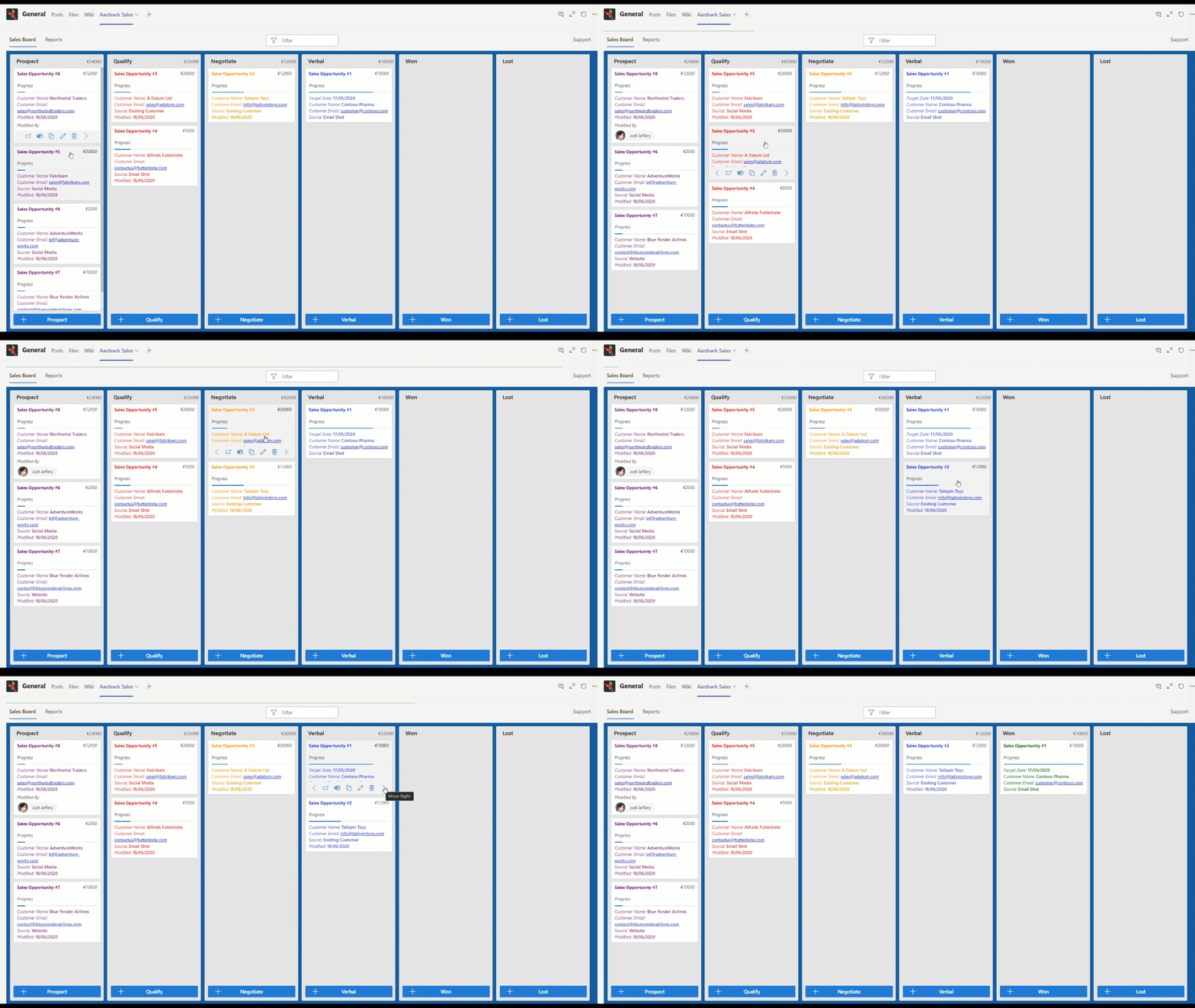
Take control of any multi-stage process
Microsoft Teams is an excellent place for working together. But there's nowhere to manage your processes. That's where Aardvark comes in. Manage any process in the same collaborative workspace you use for everything else.
Key Capabilities
Drag & Drop
With touchscreen-friendly controls, easily manage your Aardvark records with any compatible device.
Integrated Discussion
Rich discussion and collaboration features that work the same as in all your different teams and channels.
Sales Pipeline
Create new sales prospects, and advance opportunities as they progress through your identified sales process.
Intuitive Organisation
Easily organise any process-related record and move items between specified stages.
Visualise Statistics
Simple, easy-to-read charts show at a glance how many records are at each stage of the process.
The Numbers Speak
35% Time Saved
58% Productivity
80% Teams Adoption
90% Satisfaction
Pricing
Free Edition
- Compare sales opportunities by their actual currency value
- Experience our Sales Pipeline template for FREE
- Fully customisable data structures & design elements
- Free Edition is limited to a single currency
- Product support is not available on this Edition
Support Edition
- Get two months FREE with every yearly subscription
- Deployable in multiple teams and on multiple tabs
- Unlimited deployment to your Microsoft 365 tenancy
- Your data stays in your tenancy
- Roll up all Aardvark data across multiple teams & tabs
- Multi-Currency is included on this Edition
Features
Secure
Sensitive data? Aardvark stores its data in your corporate Microsoft 365 tenancy, leveraging Microsoft Teams, SharePoint Online, and Microsoft Office Graph. Nothing leaves your control.
Collaborative
Manage related documents and conversations directly in a dedicated channel. Add Aardvark to a Channel or Team multiple times, providing a familiar Kanban-style view in a Teams Tab.
Central
Drag and drop Aardvark records to move them between process stages. Each Tab can be configured to roll up data from the Channel or across the entire Team.
Your Data
Your data is yours, held completely independently from Aardvark, so you'll always have access to your information regardless of subscription status.
Customisable
Customise the data for your process by adding custom columns. Use data anywhere, including Power Platform and Flows, or gain analytical insights with Power BI.
Add-Ons
Coming Soon! Enhance the Aardvark experience further. Multi-currencies, live exchange rates, and more add-ons being added soon.
Use Cases
Discover more ways you can employ Aardvark to make your business more productive.
Content Creation
Transform Aardvark into a quality curator for briefs, budgets and required formats with automated peer review.
Building Partnerships
Focus on the most promising partner engagements and maintain relationships with automated cues.
Marketing Campaigns
Organise campaigns from scratch, including digital assets with budget information and automated performance review.
Onboarding Experience
Guide new users through steps for easier learning with traceability for management.
Project Management
Monitor a project team's progress with automatic milestone notifications and task distribution.
Conducting Training
Ensure consistent education programmes with all curriculum courseware delivered effectively.
Tendering Process
Highlight exclusive tendering opportunities from internal qualification to submitting the final published file set.
Sales Activities
All sales-related prospect details and deadlines gathered in one place, with reminders and individual pipelines.
Asset Management
Oversee current and future resource availability and plan distribution, gaining insights into committed assets.
Quality Control
Replace constant direct communication with managed quality gates, ensuring everyone is engaged through the most suitable channels.
Support Services
Aardvark is installed on your Microsoft Teams tenancy, not on your computer. You'll need a SharePoint administrator to install it. If you've not yet purchased a subscription and your trial has ended, the application will continue to operate as read-only.
Coming Soon — Choose a Start-up Aardvark Template
Customise your Aardvark Bespoke Edition to manage any process-driven output in the same Microsoft Teams driven kanban view workspace.
Sales Pipeline
Bring order to your sales opportunities. Each team can represent a product area or department. Use Aardvark in multiple tabs for competing sales teams.
Sales Focus
At every stage, Aardvark highlights the most critical information in red. Detailed fields give you necessary feedback so you never need to look elsewhere.
Campaign Engine
View the status of your marketing campaigns. Direct resources at key process stages. Encourage collaborative approaches and improve quality of output.
Content Generator
Generate precise content collaboratively. Streamline your content production process from brief to publication.
Why Teams Love Aardvark
Related Content
The prerequisites for this product are: Microsoft 365 & Microsoft Teams
Aardvark for Gamification+
GAMIFICATION+ are globally recognised leaders in gamification consultancy and training. Members of the team have collectively spoken at more than 150 events and trained more than 10,000 people.
Application Issue Tracker
CVC Capital Partners is one of the world's leading private equity and investment advisory firms. Founded in 1981, the CVC Group today employs over 400 people in 21 countries.
Microsoft 365
JFDI uses Microsoft 365 and Azure services to deliver applications fitting your business processes perfectly.
Questions before you commit?
Request JFDI professional services to help with your bespoke edition of Aardvark — from Sales Pipeline to Backlog management with Gamification features and more Add-Ons coming soon.