

JFDI WEB PARTS
A modern, multi-view calendar and planning tool for Microsoft 365
Bring clarity to your team's planning with a clean, visual year, month, week, grid, and timeline calendar for SharePoint Online. Calendar Planner helps organisations coordinate, schedule, and communicate events and activities across the year.
All powered by SharePoint lists

A clean, modern calendar experience for SharePoint Online -- built to help your team plan, coordinate, and visualise events across the year.
Instant Clarity
Team Sync
Secure Data
Why Calendar Planner?
A better way to plan and visualise your year
Calendar Planner replaces outdated SharePoint calendars and clunky overlays with a clean, modern interface designed for teams. Switch between multiple layouts, colour-code categories, manage events quickly, and get instant visibility across your organisation.
It's fast, intuitive, lightweight and built entirely for SharePoint Online.
Getting Started GuideSee It In Action
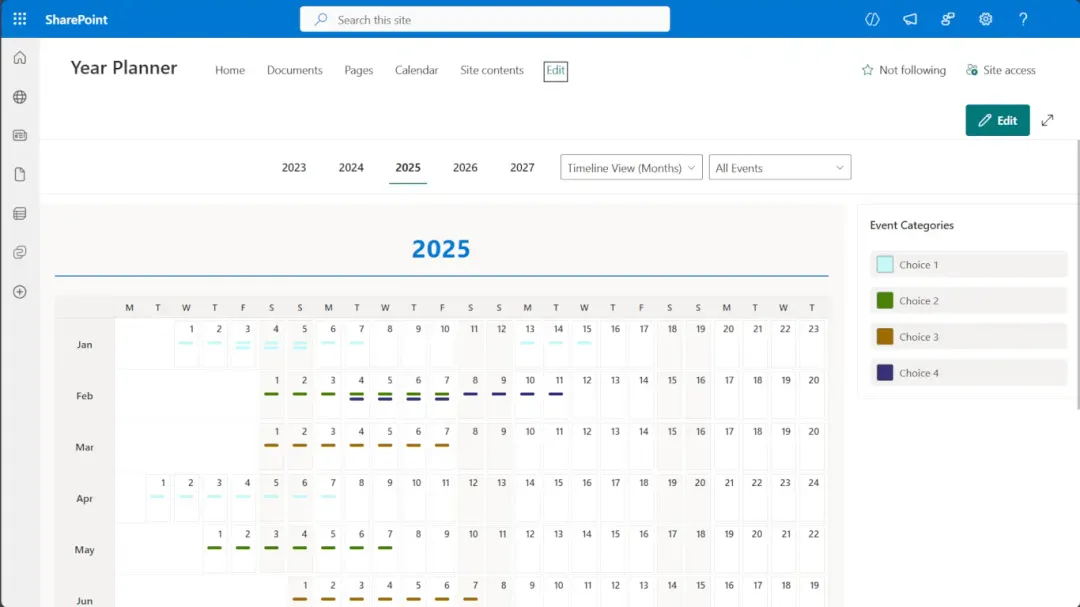
Timeline View (months)
This screenshot highlights Calendar Planner's Timeline View (months), giving your team a complete, at-a-glance overview of events across all 12 months. Colour-coded categories make it easy to spot patterns and busy periods.
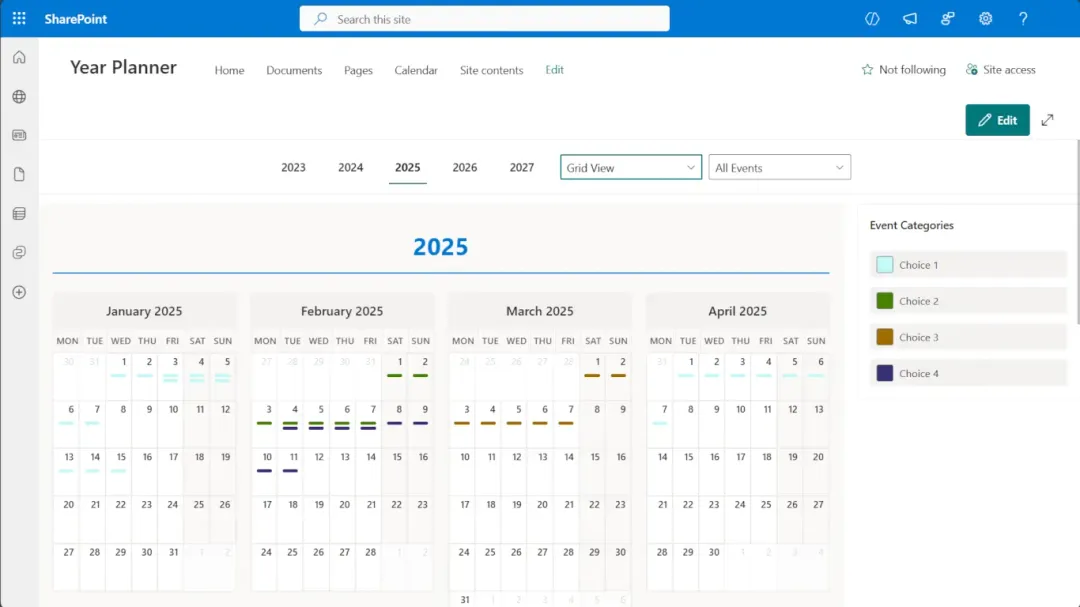
Grid View
The Grid View presents your calendar in a compact, multi-month layout. Ideal for team meetings, leadership reporting, and long-range planning.
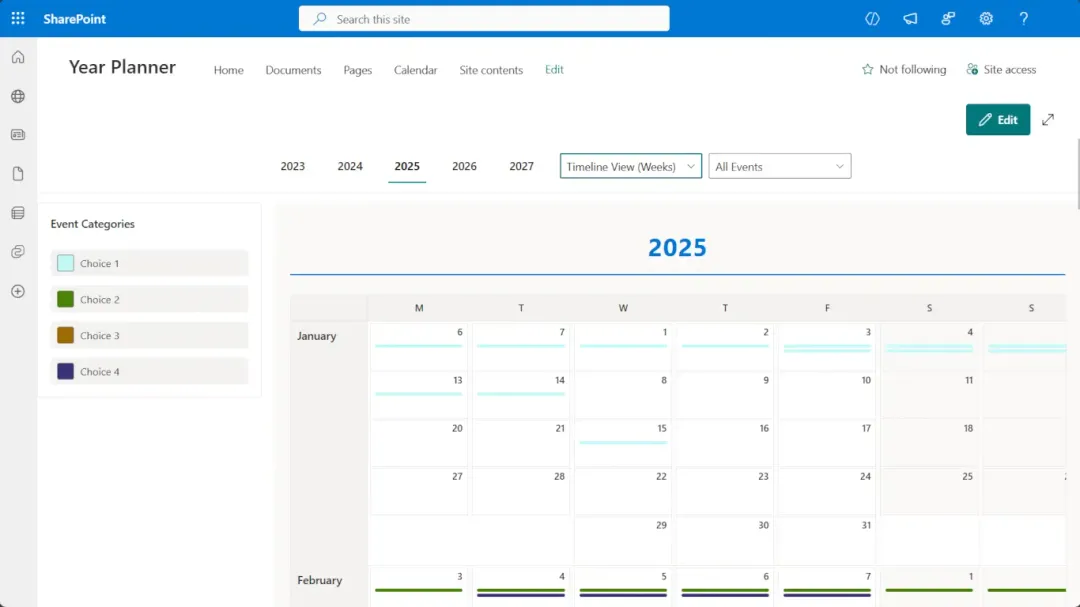
Weekly Timeline View
The Weekly Timeline View is ideal for spotting overlaps, upcoming deadlines, or busy periods across your team. Perfect for operational planning and resource management.
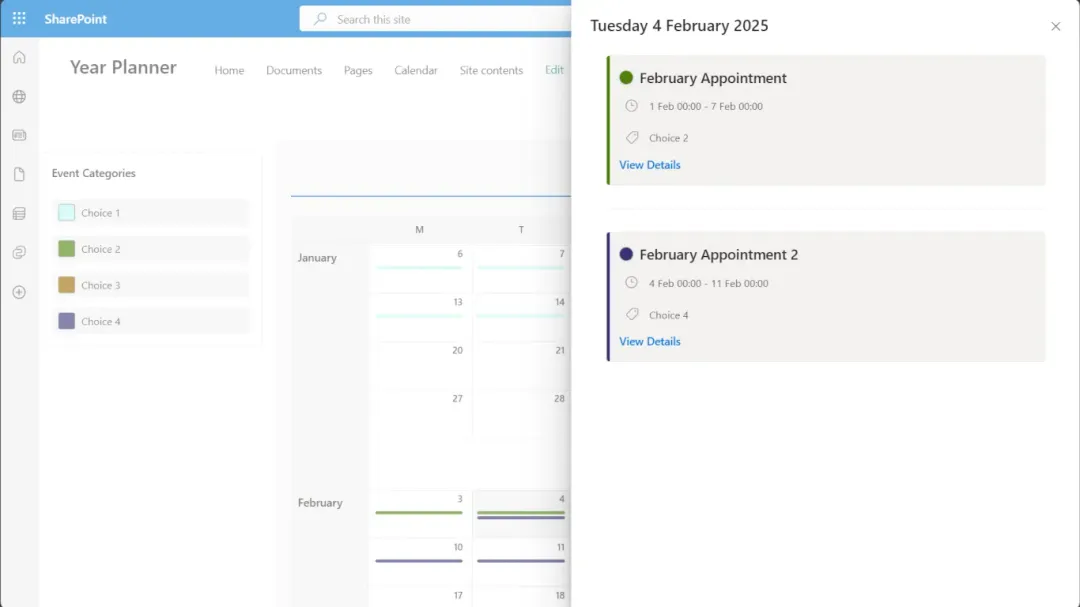
Event Details
The Event Details panel appears when selecting a day or appointment. Colour-coded category tags and a clean layout make it easy to understand what is happening at a glance.
Built for Teams & Organisations
Calendar Planner supports:
Internal Communications
Share events and activities across departments and teams.
HR & Training
Coordinate training schedules, onboarding and team events.
PMO & Project Managers
Track project milestones and cross-team dependencies.
Departmental Scheduling
Manage departmental calendars and resource allocation.
Resource Planning
Visualise team availability and workload distribution.
Organisation-Wide Visibility
Provide a shared view of events across the entire organisation.
Features
Multiple Calendar Views
Choose the view that suits your team — Year, Month, Week, Grid, or Timeline. Quickly switch between planning modes.
Colour-Coded Categories
Create categories for projects, departments, or event types — each with its own colour palette for instant visual clarity.
SharePoint-Native Storage
All data is stored in your SharePoint Online tenant using standard lists — no external data store, no hidden services.
Fast Event Management
Click any day to add an event. Edit or delete via a modern side-panel. Everything is just one click away.
Powered by M365 Security
Calendar Planner respects your SharePoint permissions and governance controls automatically. No configuration required.
How It Works
1. Install
2. Add
3. Connect
4. Configure
5. Plan
Pricing
Free
- Year Grid View — full annual calendar overview
- Deploy on any SharePoint page
- See all your calendar events at a glance
- User licensing NOT required for free features
- Enterprise features available for 30 days
Standard
- Month Timeline and Week Timeline views
- Full event management — create, edit, delete
- Smart filtering via SharePoint list views
- Teams Channel Tabs
- Configurable layout and colour customisation
Enterprise
- Month Detail View and Gantt Chart
- Print support and calendar overlay (up to 5)
- Teams Personal Tabs and Outlook integration
- Custom field mapping and configuration
Insights, Use Cases & Scenarios
Education Scenario
A university department needs a clear view of key academic dates and programme milestones with a simple annual view from existing SharePoint lists.
Project Management
Programme and PMO teams need to coordinate activity across the year and keep shared schedules accurate as plans evolve.
Large Organisations
Visibility across operational, regulatory and governance plans without consolidating them into a new planning system.
Frequently Asked Questions
Below are commonly asked questions about this Web Part.
Ready to plan better?
Get Calendar Planner for SharePoint and bring clarity to your team's schedule. Available on the Microsoft Marketplace.